

Transferring ownership of your Google Business Profile (GBP) is an essential step whenever control of a business changes hands. Whether you have sold your company, switched marketing agencies, or experienced internal team changes, making sure the right person has full ownership of your GBP is crucial.
Your profile controls how your business appears on Google Search and Maps, including contact details, reviews, photos, and business updates. Keeping ownership accurate protects your visibility, credibility, and customer trust.
The good news is that transferring ownership is a straightforward process when you follow the correct steps. If you prefer a hassle free option or want to ensure everything is handled correctly from start to finish, our agency can take care of the entire transfer for you with a smooth and secure setup.
What is Google Business Profile, and Why Ownership Matters
A Google Business Profile is the central hub that controls how your business appears on Google Search and Google Maps. It manages essential information such as your business name, address, phone number, website, reviews, photos, and updates. Accurate ownership is important because it determines who can access, edit, and protect this information.
Google assigns different access levels to maintain security and prevent unauthorized changes. The main roles are Primary Owner, Owner, and Manager. The Primary Owner has the highest authority and can transfer ownership, remove other users, and manage all settings. Owners share most permissions but cannot remove the Primary Owner or transfer the profile unless the primary role is reassigned to them. Managers have limited access and can perform daily tasks such as posting updates, responding to reviews, and editing basic info, but they cannot make major administrative changes.
Proper ownership ensures full control over your listing. It allows you to edit business information, manage reviews, publish posts, add new users, and safeguard your profile from unauthorized access.
When You Might Need to Transfer Ownership
Transferring ownership of a Google Business Profile becomes necessary in several common business situations. Ensuring the correct person holds the Primary Owner role helps maintain accuracy, security, and proper access across your listings.
When the Business Is Sold or Transferred
If you have sold your business or handed it over to a new owner, the Primary Owner role must be transferred to ensure they have full control. This includes managing reviews, editing business information, updating operating hours, and overseeing all Google-related visibility. Keeping the old owner listed can cause confusion and may delay important updates.
When Employees or Agencies Change
Internal staff turnover or switching marketing agencies often requires a transfer of ownership. The previous team member or agency may no longer be involved in daily operations, so ownership must shift to the right person. This prevents access issues and keeps your Google Business Profile secure and properly managed.
When Consolidating or Restructuring Management
Businesses with multiple locations or departments sometimes reorganize their digital assets. Consolidating all profiles under one central email or redistributing ownership during restructuring helps maintain consistency and avoid fragmented control. This is especially important for multi-location brands where accuracy and uniformity across listings are essential.
Keeping ownership up to date ensures your profile is always in the right hands and reduces the risk of errors, lost access, or outdated business information.
Step-by-Step: How to Transfer Your Google Business Profile Ownership
Transferring ownership of your Google Business Profile is simple when you follow the proper sequence. Here is a clear step-by-step guide to help you complete the transfer smoothly.
1. Log in to Your GBP Account
Start by signing in to the Google account that currently holds ownership, then go to business.google.com. This ensures you have access to the correct profile and the necessary permissions.
2. Open Your Business Listing and Access Settings
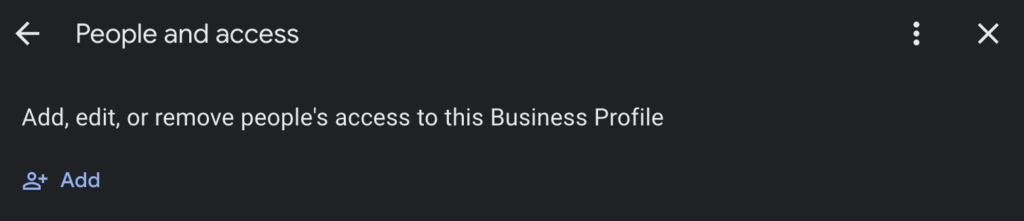
Select the business you want to manage. Once inside, go to Settings, then choose People and access or Business Profile settings, depending on the interface available to you. This is where all user management functions are located.
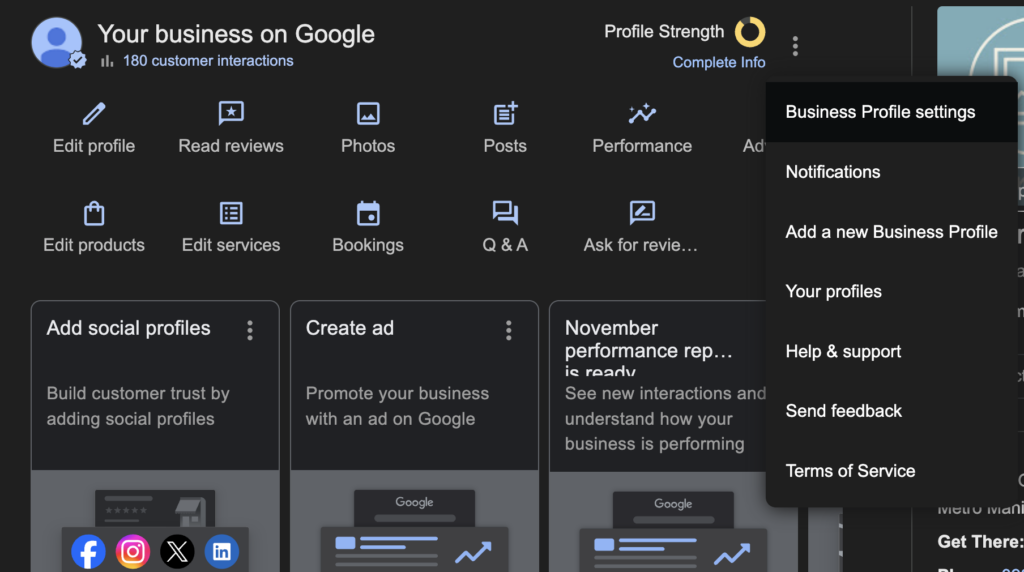
3. Add the New Owner
Click the option to Add user, enter the email address of the person who should gain ownership, and assign them the Owner role. If they are already listed as a Manager or Owner, simply upgrade their role instead of adding them again.
4. Wait for the New Owner to Accept the Invitation
The new owner will receive an email invitation from Google. They must accept it before the transfer can proceed. Once they confirm, return to People and access to complete the process.
5. Reassign the Primary Owner Role
After they have accepted the invitation, open their user permissions and change their role to Primary owner. This gives them full control of the profile, including access management and major business updates.
6. Remove the Previous Primary Owner if Needed
If the previous primary owner should no longer have access, you can remove them from the user list. This step is optional but recommended when ownership is fully changing hands, such as in a business sale or agency transition.
Following these steps ensures a smooth and secure ownership transfer. If you prefer expert assistance, our agency can manage the entire process for you to avoid delays, mistakes, or access issues.
Important Considerations and Common Pitfalls
Before transferring your Google Business Profile ownership, it is essential to understand a few limitations and potential issues that can slow down or complicate the process. Paying attention to these details helps ensure a smooth transition without losing access or disrupting your business visibility.
Expect a 7 Day Waiting Period
After assigning a new Primary Owner, Google imposes a seven day waiting period before they can perform certain high level actions. These include deleting the profile, removing other owners, or making major administrative changes. This security buffer prevents unauthorized transfers and protects your business data.
Make Sure the Profile Is Verified
Transfers and access changes only work on verified Google Business Profiles. If your listing is not verified, you must complete verification first. This step is essential because Google will not allow ownership changes on unverified profiles.
Review All Business Information After the Transfer
Once ownership has been transferred, take time to double check all key details on your profile. Confirm that your business address, operating hours, phone number, category, and other contact information are correct. This is especially important if the business has changed hands or undergone operational changes.
Update and Inform Internal Stakeholders
Although optional, it is a good practice to let your team, new agency, or internal departments know who now manages the profile. Clear communication prevents confusion, duplicated efforts, or accidental edits made by people who no longer have access.
Keeping these considerations in mind helps you avoid common mistakes and ensures your profile remains accurate, secure, and fully operational during the ownership transition.
When You Might Need Help — Why Let an Agency Do It for You
Transferring a Google Business Profile may seem simple, but small mistakes, such as entering the wrong email or forgetting to verify the invitation can cause delays or even lock you out of your own listing. If you manage multiple listings or locations, the manual transfer process for each one can also be time-consuming and prone to errors.
This is why many businesses prefer to work with an expert team. Agencies have established standard operating procedures that ensure a smooth, secure, and efficient transition.
Our agency can handle the entire process for you, including sending invites, verifying acceptance, transferring ownership, and completing all necessary post-transfer checks so you can stay focused on running your business.
Conclusion
Transferring Google Business Profile ownership is completely manageable when you follow the correct steps and understand the key requirements. With proper access, clear communication, and careful verification, you can smoothly shift control to the right person without disrupting your business visibility.
If you prefer a hassle-free and error-proof solution, our agency is here to help. Contact us, and we will take care of the entire ownership transfer process for you, ensuring everything is handled quickly, securely, and with zero stress on your end.