A lot of business owners assume they can’t use Google Business Profile unless they have a visible, public address. The truth is, you can create a fully functioning, high-ranking GBP (with help from an expert) even if you don’t want your physical location displayed.
Google supports service-area businesses, home-based businesses, and mobile professionals who work on-site rather than from a storefront.
This matters more than most people realize. A properly set up GBP gives you credibility, boosts your visibility in Google Maps, helps you appear in “near me” searches, and brings in more leads from customers who are ready to book.
Even without a physical address shown, your business can still dominate your local area, as long as your profile is set up the right way.
Can You Have a Google Business Profile Without a Physical Address?
Yes, Google allows service-area businesses to hide their address and still appear in Maps and local search results.
This setup is perfect for businesses that operate on-site or travel to customers, such as plumbers, cleaners, mobile hairstylists, on-site technicians, photographers, and consultants.
To stay compliant with Google’s rules, there are a few requirements you need to follow:
- You must still provide a real address during verification.
- That address will be hidden from public view once the profile is approved.
- Your service areas must be accurately listed to ensure proper visibility and avoid suspension.
Google created this option specifically for businesses that don’t rely on walk-in traffic. By hiding your address and highlighting your service areas, you can focus on ranking where your clients actually are, without exposing your home address or private location.
It gives you the same visibility and competitive advantage as storefront businesses, while keeping your information secure.

Benefits of a Google Business Profile for Businesses Without a Location
Even without a physical location, your business can still appear in local search results and Google Maps. This lets potential customers find you when they search for services in your area, especially “near me” queries.
Stronger Credibility and Trust
A complete GBP helps you build trust through reviews, business information, photos, and consistent updates. Customers are far more likely to choose a business that appears legitimate and active on Google.
Rank in Targeted Service Areas
Service-area businesses can rank in multiple nearby cities or ZIP codes. This allows you to expand your visibility beyond just one neighborhood and attract clients across your actual working radius.
Showcase Services and Business Highlights
You can highlight your service categories, upload photos of your work, publish updates, share offers, and add detailed service descriptions. These elements help Google understand your business and improve your relevance for searches.
Higher Conversions and More Client Bookings
A well-optimized GBP increases trust and reduces hesitation, leading to more calls, messages, website visits, and bookings. Customers are more likely to choose a business that looks active, verified, and well-reviewed.
Compete With Storefront Businesses
Even without a public address, you can compete directly with businesses that do have physical locations. With the right optimization, service-area businesses can rank just as high — or even higher — in local search results, giving you a powerful advantage in your market.
Is Your GBP Losing to Competitors?
Get Your Free Google Business Profile Audit in 60 Seconds
Challenges Service-Area Businesses Face
Verification Issues
Service-area businesses often run into verification problems because Google still requires a real address for confirmation, even if it will be hidden later. Mistakes during this step can cause delays or prevent verification altogether.
How GBPin helps: We handle the entire verification process for you, ensuring your address is entered correctly, hidden properly, and compliant with Google’s rules to avoid unnecessary delays.
Suspensions From Incorrect Address Settings
One of the most common issues SABs face is sudden suspension caused by incorrect address setup, overlapping service areas, or violations of Google’s visibility rules.
Poor Rankings From Wrong Service Area Setup
If your service areas are too broad, too small, or incorrectly selected, your rankings suffer. Many SABs unknowingly limit their visibility by choosing the wrong cities or ZIP codes.
Limited Visibility From an Incomplete Profile
An incomplete profile — missing categories, unoptimized descriptions, weak photos, or no updates — results in low trust and poor performance. Google prioritizes complete, active profiles.
Confusion Around Google’s SAB and Practitioner Guidelines
Google’s rules for service-area businesses, practitioners, and home-based companies are often misunderstood. One mistake can lead to ranking drops or suspension.
With GBPin handling the technical setup and ongoing optimization, you avoid these common challenges and turn your GBP into a powerful lead-generation asset — even without a physical storefront.
How to Set Up a Google Business Profile Without Showing Your Address
Setting up a Google Business Profile as a service-area business is simple once you understand the basics. Here’s the straightforward process:
1. Choose “Service-Area Business”
During setup, select the option for a service-area business. This tells Google you travel to customers rather than serve them at a storefront.
2. Enter a Real Address for Verification
Google still requires a real address for verification purposes. This address will not be publicly displayed; it’s only needed to confirm your business is legitimate.
3. Hide Your Address From Public View
Once verified, choose the option to hide your address. Customers will see only your service areas, not your home or private location.
4. Add Accurate Service Areas
Select cities, towns, or ZIP codes where you actually serve customers. This helps Google rank you in the right locations and show you for “near me” searches.
5. Add Essential Business Content
Upload photos, list your services, choose the right categories, and write a clear business description. These elements help Google understand exactly what you offer.
How GBPin Helps You Set Up Everything Correctly
GBPin handles the entire setup for you — whether you operate with or without a physical location. With over 20 years of combined expertise in GBP management, local SEO, and business branding, we ensure your profile is created correctly from day one.
We work with a wide range of industries, including:
- Home services
- Medical and health professionals
- Real estate
- Beauty and wellness
- Contractors and trades
- Retail and e-commerce
- Professional services
- Mobile and home-based businesses
GBPin ensures your address is verified properly, hidden correctly, and fully compliant with Google’s guidelines. From setup to optimization, we build a profile that’s ready to rank and attract customers immediately. No guesswork, no risk of suspension, and no wasted time.
How to Optimize a GBP With No Physical Location
Optimizing a Google Business Profile without a physical address is straightforward as long as you focus on the essentials. Here are the basics every service-area business should follow:
Use Local Keywords
Add simple, location-based keywords to your services and business description so Google understands where you operate and what you offer.
Choose the Right Service Areas
Select targeted cities or ZIP codes that reflect where you actually work. Avoid choosing too many areas or overlapping regions, as this can weaken your visibility.
Stay Active With Posts and Photos
Upload service photos and publish posts regularly to show that your business is active and trustworthy. Google favors profiles that stay updated.
Get Reviews and Respond to Them
Encourage customers to leave reviews and make sure you respond to each one. Reviews are one of the strongest ranking and trust signals.
Monitor Your Performance
Check your insights, rankings, and customer actions. Adjust your service areas or content if you’re not showing up where you want to be.
Stay Compliant With Google’s Rules
Google updates its service-area business policies often, and even small mistakes can affect your visibility.
These are just the core basics. If you want deeper optimization, competitive analysis, or a full done-for-you strategy, GBPin can help you set up, optimize, and manage your GBP for stronger local visibility and faster results — even without a physical location.
How GBPin Helps You Rank Without a Physical Address
Full GBP Setup for Service-Area Businesses
GBPin sets up your Google Business Profile the right way from day one, following Google’s service-area business (SAB) guidelines. We verify your real address privately, hide it correctly, and make sure your profile is fully compliant. This avoids the most common triggers that lead to verification issues or sudden suspensions.
Expert Optimization for SAB Ranking
Our optimization process is built specifically for businesses that operate without storefronts. We refine every ranking factor, including:
- Categories
- Service areas
- Business description
- Photos
- Services and service descriptions
- Posts and updates
This ensures your GBP is strong, competitive, and fully aligned with what Google wants to see from a high-ranking SAB profile.
Suspension Protection
Home-based and mobile businesses are more prone to suspensions due to address or guideline errors. GBPin protects your profile by keeping it compliant and stable. If you already have issues such as duplicate listings, incorrect address settings, or suspensions, we help fix them and manage reinstatement.
Faster Local Rankings
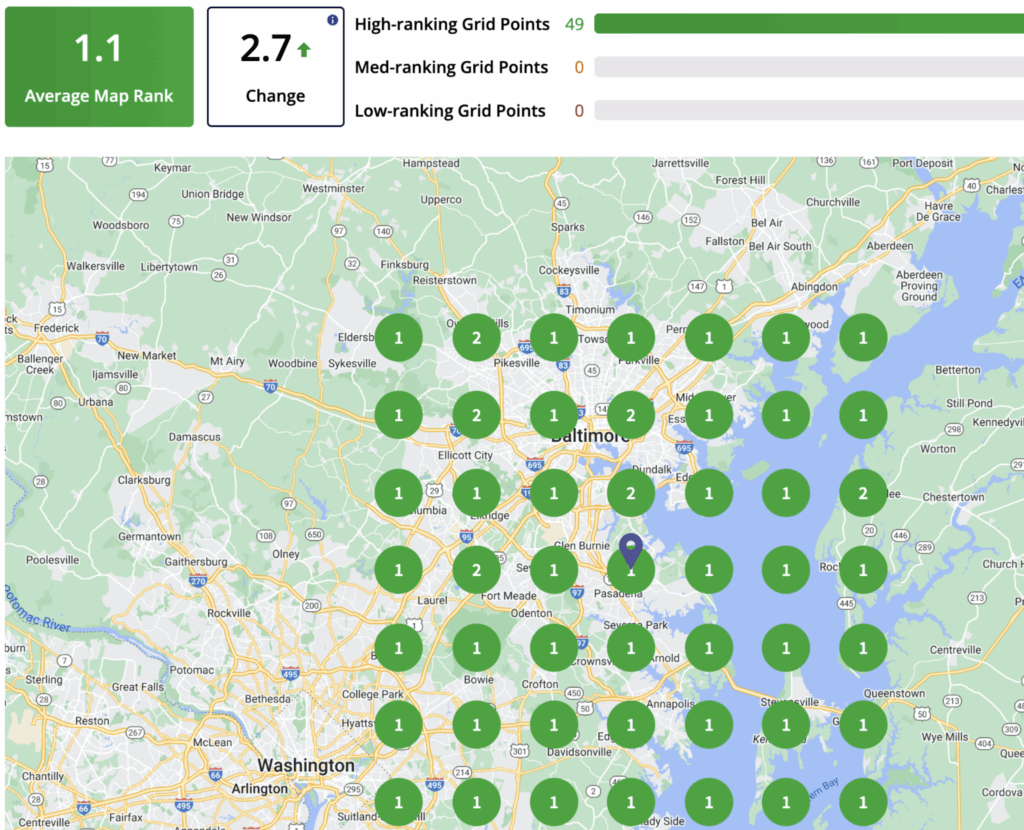
We use targeted service-area optimization to boost visibility exactly where your customers are searching. Our free intelligent GBP audits and heatmap tracking show how you rank across different neighborhoods. With weekly updates and performance tracking, your profile continually improves.
Done-for-You Management
GBPin handles everything for you, so you don’t have to worry about learning Google’s rules or dealing with constant updates.
We provide:
- Complete optimization
- Weekly posting and updates
- Review management
- Competitor analysis
- Citations
- 24/7 monitoring
- Over 20 years of brand-building and local SEO experience
With GBPin managing your GBP, your business can stand out, attract more customers, and rank confidently even without a physical location.